
What is a sprint retrospective? Definition, stages & examples
A sprint retrospective is the Scrum meeting where a team reflects on the last sprint and agrees improvements. Learn the 5 stages, who attends, and how to make action items stick.
A sprint retrospective is the recurring Scrum meeting, held at the end of every sprint, where the team reflects on how it worked and agrees concrete improvements for the next sprint. It is the team’s main opportunity to inspect and adapt the way it works, and it is the last of the four Scrum ceremonies in each sprint.
Most teams can run a sprint retrospective. Far fewer run one that changes the next sprint, and that is the only test that really matters. If your retros have started to feel like a meeting nobody fights for, you are not alone. The format goes stale, the same two people talk, and action items get logged then quietly forgotten. The mechanics usually are not the problem. Follow-through is — and our data on how often retro actions actually get done shows what separates the teams who manage it from the teams who don’t.
This chapter covers what a sprint retrospective is, how it differs from the sprint review, the five stages that give the meeting its shape, and the part most guides skip: how to make the actions actually land. The “retro,” as it is commonly known, is also called a scrum retrospective or an agile retrospective. Whatever you call it, the goal is the same: improve how the team works going forward, based on what it learned from the sprint just gone. For the broader picture beyond Scrum, see running effective retrospectives, which covers the practice for any team that finishes work in cycles.
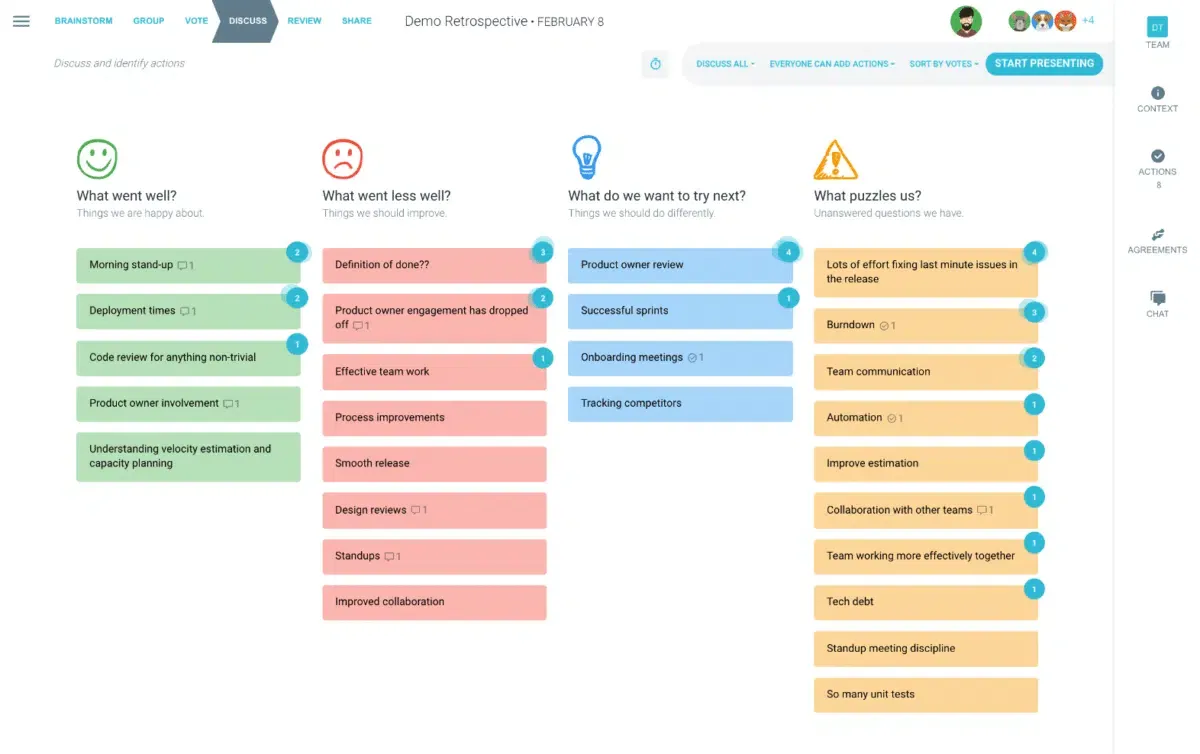
Done well, the retrospective is the highest-leverage hour in your sprint cycle. The team shares what went well and what did not, looks for common themes, votes on what matters most, and agrees a short set of actions to carry forward. Those actions are what let the team continuously inspect and adapt, and improve both the quality and the pace of its work.
Sprint retrospective vs sprint review
These two ceremonies get conflated constantly, and that mix-up is the single most common reason a retrospective drifts into a status update.
Per the Scrum Guide, the sprint review inspects the product: what got built, whether it meets the goal, and what stakeholders think of it. The sprint retrospective inspects the process: how the team collaborated, what tools helped or slowed it down, and what it should try differently. One looks outward at the output. The other looks inward at the way the work got done.
Keep that line clear. The moment a retrospective becomes a rundown of tickets closed, you have lost the meeting that is meant to be about the team, not the backlog. For a full side-by-side, see sprint review vs sprint retrospective.
What questions does a sprint retrospective ask?
The key areas for the team to explore are:
- What went well?
- What did not go well?
- What ideas do we have going forward?
- How do we put those actions into practice?
- Who should we acknowledge, and what do we need?
The exact question set can come from a theme in a one-on-one, from team feedback, or from a data source such as your sprint metrics. It helps to vary the questions every few sprints so they stay relevant and current, and to keep meeting fatigue at bay.
Who joins the sprint retrospective?
The sprint retrospective is a Scrum Team meeting. Depending on the team, it can involve some or all of the following:
- The Scrum Master, who usually facilitates
- The whole development or Scrum Team
- The Product Owner
- An agile coach
- An observer
Stakeholders are generally left out so the team can talk openly about how it works, rather than performing for an audience.

How long should a sprint retrospective run?
This is usually based on the length of your sprint cycle. As a rough guide:
- Two-week sprint: about 90 minutes
- One-month sprint: about 3 hours
- End of a longer iteration: up to a day
The shorter the sprint, the shorter the retro. What matters is that it is long enough to reach concrete, agreed actions, and short enough that the energy holds. Tight timeboxing keeps a retrospective moving and stops one topic eating the whole hour.
The five stages of an effective retrospective
The structure that holds up, sprint after sprint, comes from Esther Derby and Diana Larsen’s book Agile Retrospectives: Making Good Teams Great. Their five-stage model gives each part of the meeting a specific job, which is exactly what keeps a retro from turning into an unstructured gripe session. The Scrum Master guides the team through all five.
- Set the stage. Get people oriented and willing to speak. A quick check-in question does more work here than people expect, and it is also where you choose the retrospective template that frames the session.
- Gather data. Collect what actually happened, not opinions about it yet. A timeline review, sprint metrics, or a simple round of “what did you notice” all work. This is where the Scrum Master steps fully into the facilitator role.
- Generate insights. Look for patterns and connections across the data. Why did the same blocker show up three sprints running? Group similar ideas, vote on what matters most, and discuss the top-ranked items in depth.
- Decide what to do. Turn insight into a short list of specific, ownable changes. Not ten. Two or three. This is the stage that separates a retrospective from a chat.
- Close the retrospective. Confirm what was agreed, make sure every action has an owner, thank the team, and end on time.
Skip “set the stage” and a quiet team stays quiet. Skip “decide what to do” and you get a feelings dump with no owner attached. Each stage covers for a specific failure mode, which is why cutting corners here shows up in your outcomes later, not in the room.
Every stage maps to a ready-to-run retrospective template in TeamRetro, so the structure, timer, and voting are already set up before anyone joins.
Make your action items actually stick
Here is the part most guides skip, and it is the one that decides whether your retrospective was worth the hour: what happens to the actions after everyone logs off. Retros rarely fail for lack of ideas. They fail because the ideas never turn into a change anyone can point to.
The fix is almost boringly specific:
- One owner per action. Not “the team.” A name.
- One sprint. If it cannot happen before the next retro, it is too big. Break it down.
- Reviewed first, next retro. Before you gather any new data, check the last set of commitments. Did they happen? If not, why not?
That third point is the one teams drop first, and it is the one that makes the other two mean anything. An action item that is never revisited is just a sticky note with extra steps. For more on this, see what percentage of action items actually get done, and why retrospectives fail for the deeper pattern behind it.
Getting a quiet team to talk
Every team has a version of the same problem: two people talk, the rest nod. It is rarely disengagement. More often, trust has not been earned yet, especially on newer or distributed teams. A few things move the needle: set the norm that retros improve the system rather than score points on individuals, let people enter ideas anonymously so the unpopular thought still gets said, and rotate facilitation so the room is not always performing for the same person.
None of this is complicated. It just has to be deliberate, because a quiet retro does not announce itself as a trust problem. It just looks like a short meeting. For the full playbook, see how to build a psychologically safe retrospective.
Keep retros from going stale
Even a well-run retrospective goes flat if it looks identical every sprint. The five stages do not change, but the format wrapped around them should, every few sprints, on purpose. The signs are easy to spot: people answer on autopilot, the same sticky notes show up in different words, or someone sighs when the calendar invite pops up. That does not mean retros have stopped working. It means this particular shape of retro has worn out its welcome.
Rotating through a small handful of formats keeps the structure fresh without losing the discipline behind it. Our posts on avoiding retrospective anti-patterns and overcoming recency bias go deeper on keeping retros from calcifying into ritual.
Run your sprint retrospective in TeamRetro
A sprint retrospective only earns its place on the calendar if it changes what happens next sprint. That means keeping the review and the retro distinct, giving each of the five stages room to do its job, making it safe for quieter voices to speak up, and treating action items as commitments rather than notes.
The follow-through is the hard part, and a better meeting format alone does not fix it. Run your next retrospective in TeamRetro and the structure, timer, and action tracking are built in, with last sprint’s actions carried forward automatically, so chasing commitments is no longer a manual job. Browse the retrospective template library to pick a starting point.
Frequently asked questions
What is a sprint retrospective?
A sprint retrospective is a recurring Scrum meeting held at the end of every sprint where the team reflects on how it worked and agrees on concrete improvements for the next sprint. It is the team’s main opportunity to inspect and adapt the way it works, and it is the last of the four Scrum ceremonies in each sprint.
Who attends a sprint retrospective?
The sprint retrospective is a Scrum Team meeting, so it involves the Developers, the Product Owner, and the Scrum Master. The Scrum Master usually facilitates. Stakeholders are generally not included, so the team can speak openly about how it works; an agile coach or observer may occasionally attend to support the team.
How long should a sprint retrospective be?
Timebox the retrospective to the length of the sprint. A common guide is about 90 minutes for a two-week sprint and up to about three hours for a one-month sprint. The shorter the sprint, the shorter the retrospective, and what matters is that it is long enough to reach concrete, agreed actions.
What are the five stages of a sprint retrospective?
Esther Derby and Diana Larsen describe five stages: set the stage, gather data, generate insights, decide what to do, and close the retrospective. The Scrum Master guides the team through each stage so reflection turns into a short, owned list of improvements for the next sprint.
What is the difference between a sprint retrospective and a sprint review?
The sprint review inspects the product, so the team shows completed work to stakeholders and gathers feedback. The sprint retrospective inspects the process, so the team reflects on how it worked and agrees improvements. The review faces outward to stakeholders; the retrospective faces inward to the team. See our chapter on sprint review vs retrospective for a full comparison.