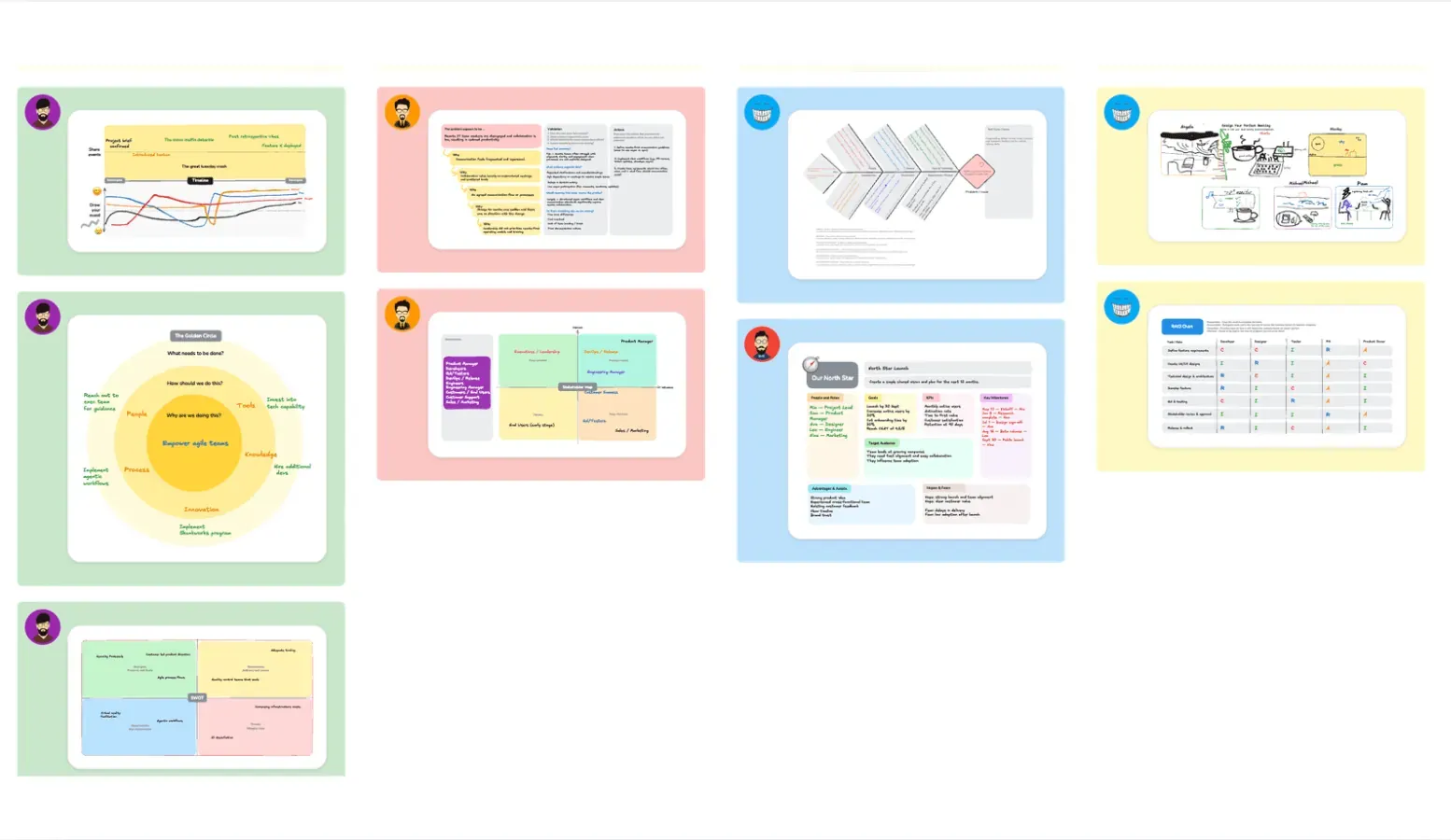
Post-implementation review example for a rollout that missed its targets
A worked post-implementation review example: the filled-in board, the actions agreed and the one-page summary the sponsor received.
Eight weeks after go-live, the sponsor asks a fair question: did the new system deliver what the business case promised? The project team has opinions and the help desk has a queue of tickets. Nobody has set either one next to the original targets.
This post-implementation review example shows one way to do that. It follows a single review from the numbers the facilitator gathered beforehand, through the five columns of the board, to the summary the sponsor received afterward.
The company and its figures are illustrative. They are built from the sample ideas in TeamRetro’s post-implementation review template, so you can open the same board and replace each note with your own.
The rollout under review
A mid-sized company replaced its old CRM and a separate reporting tool with one system for finance, orders and customer records. The business case set four targets that could be checked after go-live:
- Process invoices in two days, down from six
- Have 90% of staff using self-service
- Retire the old CRM by June
- Stay within the approved budget
The review took place eight weeks after go-live. The sponsor and the delivery team attended, along with people from finance and the help desk who use and support the system every day.
Before the session, the facilitator pulled the business case, the success measures and the go-live date, then added the main numbers to the first column herself. A review that starts without those numbers turns into a trade of opinions.
The filled-in board, column by column
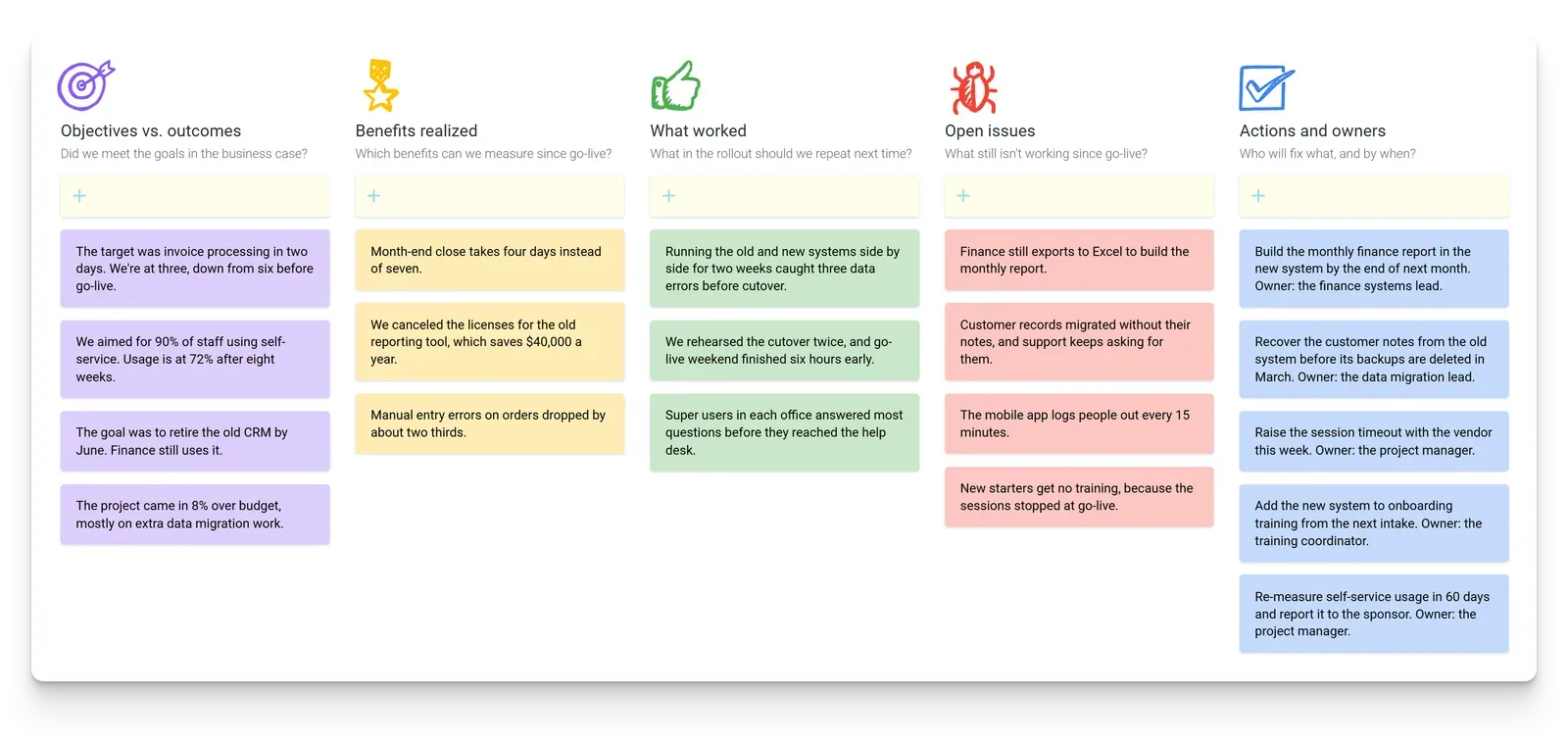
In TeamRetro, everyone adds ideas privately first. The group then sorts them, votes on the issues that matter most and assigns the actions. This is what each column held once the notes were sorted.
Objectives vs. outcomes
This column asks: did we meet the goals in the business case?
- The target was invoice processing in two days. We’re at three, down from six before go-live.
- We aimed for 90% of staff using self-service. Usage is at 72% after eight weeks.
- The goal was to retire the old CRM by June. Finance still uses it.
- The project came in 8% over budget, mostly on extra data migration work.
All four targets were missed, although invoice processing time had halved. For each one the group wrote down the gap and saved the reasons for the discussion.
Benefits realized
This column asks: which benefits can we measure since go-live?
- Month-end close takes four days instead of seven.
- We canceled the licenses for the old reporting tool, which saves $40,000 a year.
- Manual entry errors on orders dropped by about two thirds.
The facilitator asked where each figure came from. One note read “should save time” and had no number behind it. It moved to the last column with a date to measure it, so nobody counted it early.
What worked
This column asks: what in the rollout should we repeat next time?
- Running the old and new systems side by side for two weeks caught three data errors before cutover.
- We rehearsed the cutover twice, and go-live weekend finished six hours early.
- Super users in each office answered most questions before they reached the help desk.
For each note, the group asked what had made it possible. The answers are what the next rollout can reuse.
Open issues
This column asks: what still isn’t working since go-live?
- Finance still exports to Excel to build the monthly report.
- Customer records migrated without their notes, and support keeps asking for them.
- The mobile app logs people out every 15 minutes.
- New starters get no training, because the sessions stopped at go-live.
The group merged duplicates and voted. The Excel export and the missing customer notes came out on top, because both cost finance and support time every week.
Actions and owners
This column asks: who will fix what, and by when?
- Build the monthly finance report in the new system by the end of next month. Owner: the finance systems lead.
- Recover the customer notes from the old system before its backups are deleted in March. Owner: the data migration lead.
- Raise the session timeout with the vendor this week. Owner: the project manager.
- Add the new system to onboarding training from the next intake. Owner: the training coordinator.
- Re-measure self-service usage in 60 days and report it to the sponsor. Owner: the project manager.
The group also decided which actions the project team would finish and which would move to business-as-usual support.
What the sponsor received afterward
The facilitator turned the board into a one-page summary the same day:
- Objectives: four set in the business case, all four missed. Invoice processing went from six days to three against a target of two. Self-service is at 72% against 90%. The old CRM is still in use. Cost came in 8% over budget.
- Benefits measured: month-end close down from seven days to four, $40,000 a year saved on reporting licenses, and order entry errors down by about two thirds.
- Benefits not yet shown: self-service adoption, to be measured again in 60 days.
- Open issues: four, each with an owner and a due date.
- Next check: a short follow-up session in 60 days to review the actions and the new usage figure.
A summary like this gives the sponsor evidence for closing the project. It also shows the next project which estimates and benefits were realistic.
Why this review led to decisions
Five habits separated this session from a round of complaints.
- The numbers were on the board first. The business case targets were in the first column before anyone joined, so every comment had something to be measured against.
- Measured benefits were kept apart from expected ones. “Month-end close takes four days instead of seven” is a result. “Should save time” is still a hope.
- Users and support were in the room. They see the issues the project team has stopped noticing.
- Nobody was on trial. The questions were about what in the plan, the process or the tools let an issue through. The retrospective prime directive sets the same ground rule for sprint teams.
- Every issue left with an owner and a date. In TeamRetro’s own data on whether retrospective action items get done, actions with a named owner and a due date are completed about 90% of the time.
When to hold your own review
The template suggests one to three months after go-live, when enough people have used the system to judge it. A major or failed IT change is often reviewed sooner, while the details are still fresh.
Formal guidance for large IT projects tends to set the date later. California’s State Administrative Manual, section 4947, says six months to one year after implementation is typical for the assessment behind its post-implementation evaluation report. It requires the assessment within 18 months of project completion.
The two timings can work together. Hold the first session at one to three months, before you close the project budget or hand the system to business-as-usual support, so every open issue has an owner. Then book a second check for the benefits that need more time to show.
How it differs from similar reviews
Four reviews get confused with each other. Each answers a different question.
- Post-implementation review: did the change deliver what the business case promised, now that it is live?
- Post-mortem: what happened during an incident or project, what broke, and why?
- After action review: what was planned, what happened, and why were they different? It is held straight after an event ends.
- Lessons learned: what advice should the next project take from this one?
A release retrospective looks at how a release was delivered. The post-implementation review comes later and asks what the release achieved. Teams that already run retrospectives every sprint will find the format familiar. The new parts are the business case and the people from outside the delivery team.
Frequently asked questions
What does a good post-implementation review example include?
A useful example shows real content in every part of the review. Look for the original objectives with their target numbers, the measured outcomes next to them, the benefits with their sources, the issues still open, and the actions with an owner and a due date for each. An example with empty headings is a template.
Who should attend a post-implementation review?
Invite the sponsor, the delivery team and the people who use or support the system. Users and support staff matter most, because they live with the workarounds every day. The sponsor needs to hear the open issues first-hand and can decide which ones the project still funds.
What happens when the review shows the benefits were missed?
Record the gap next to the objective and write down the reasons. Then turn each missed objective into an action with one owner and a due date. Benefits that have not appeared yet get a date to be measured again, so they are neither written off nor counted early.
Is a post-implementation review the same as a post-mortem?
No. A post-implementation review checks the result of a change against its business case once the change is live. A post-mortem rebuilds what happened during an incident or a project to find what broke and why. Many teams run both: the post-mortem close to the event, and the post-implementation review after a period of real use.
To run this review with your own numbers, open the free post-implementation review template in TeamRetro and invite the sponsor, the delivery team and the people who use the system.
Related posts
- October 8, 2026AI sentiment in retrospectives: what it could mean for your team

- September 23, 2026CLAUDE.md for teams: how we turned five people's AI memories into shared rules

- July 18, 2026The best team health check tools in 2026

- July 18, 2026Our AI teammates joined our retro
- July 16, 2026AI in Agile Project Management: What Teams Need to Know
- July 13, 2026Context engineering needs a feedback loop
- July 13, 2026How to gather feedback from your AI agents

- June 25, 2026Online whiteboards for retrospectives: templates and techniques that work