AI sentiment in retrospectives: what it could mean for your team
How AI sentiment analysis works in TeamRetro retrospectives: what it reads, the trend chart in Insights, topic labels, and how to act on it.
Every team that runs retrospectives is quietly keeping a record of how it feels. Each month, a few dozen notes say what went well, what didn’t, and what needs to change. Over a year, that adds up to hundreds of honest observations about how the team works, and how it has evolved.
But in reality, not everybody rereads them. The retro ends, the actions get written up, and the board is archived. The patterns are all in there, spread across a dozen boards. They’re just not anywhere you can see them at once.
That’s where using AI to explore team sentiment in retrospectives can help. In TeamRetro, AI securely reads what the team writes in every retro over time, and lets you and the team explore it further with:
- word clouds with drill-downs
- trAI, the built-in chat assistant
- trend lines in your team Insights.
Below, we show what AI sentiment analysis looks like in TeamRetro, using one of our own teams as an example.
What AI reads in a retrospective, and what it doesn’t
TeamRetro’s AI works from what your team writes in a retrospective. In Insights, it annotates the discussion with a theme, a sentiment, and keywords. The themes are the ones a retrospective keeps returning to: team dynamics, planning, people, leadership, process, and engineering. Your data is safe, isn’t used to train models, and is not accessible to people who don’t have the right access to your team.
The output unit is the topic or the theme, not the person. Nobody gets a mood score. That isn’t a judgment AI should make. The AI doesn’t read faces, tone of voice, calendars, or chat outside the meeting. It reads only what people chose to write down in the retro, so the signal is only as good as the retro that produced it.
The analysis runs on AWS Bedrock using Anthropic’s Claude Sonnet 5.x. It’s on by default and can be turned off at any time. Your data is processed briefly and is never stored or used to train the AI. TeamRetro does not build or train models of its own. Where the AI suggests something the team then acts on, a summary, a grouping or an action, a person reviews it and decides what to keep. The full detail, including the guardrails that monitor and restrict AI use, is on the Responsible AI page.
There’s no analysis of individuals. That would simply break psychological safety. What we want to know is what issues teams are currently putting forward for discussion based on the retrospective prompts.
In short, AI can tell us which topics are being brought up and whether they’re framed more positively or negatively based on the context, headers, and theme of the retrospective.
How we analyzed sentiment in our own retrospectives
Our marketing team made a good test case. It’s four to seven people, it’s stable, and it has worked together for a few years. Lately, though, it has taken on more: new projects, more responsibility, and a steady stream of feature releases to support. That kind of pressure tends to show up in a retro before it shows up anywhere else.
So we followed one thread, starting in a retro and looking at it from five views, each a different way of seeing the same retro data: trAI in the meeting, the word cloud and the sentiment trends chart in Insights, the team’s own history through Claude over MCP, and finally what the team had done about it.
The data covers 11 monthly retros and 436 retro items, and we checked every finding against what the team actually wrote. Names and individual comments stay private, so what follows is aggregated. It’s one small team, so treat it as a worked example, not a benchmark.
View 1: in the meeting, with trAI
Each month we change our retro format to explore a different theme. In July, for example, we framed it around wins, battles, lessons and next steps:

During our latest retro, rather than rely on memory, we asked trAI to look back at the two retros before it:
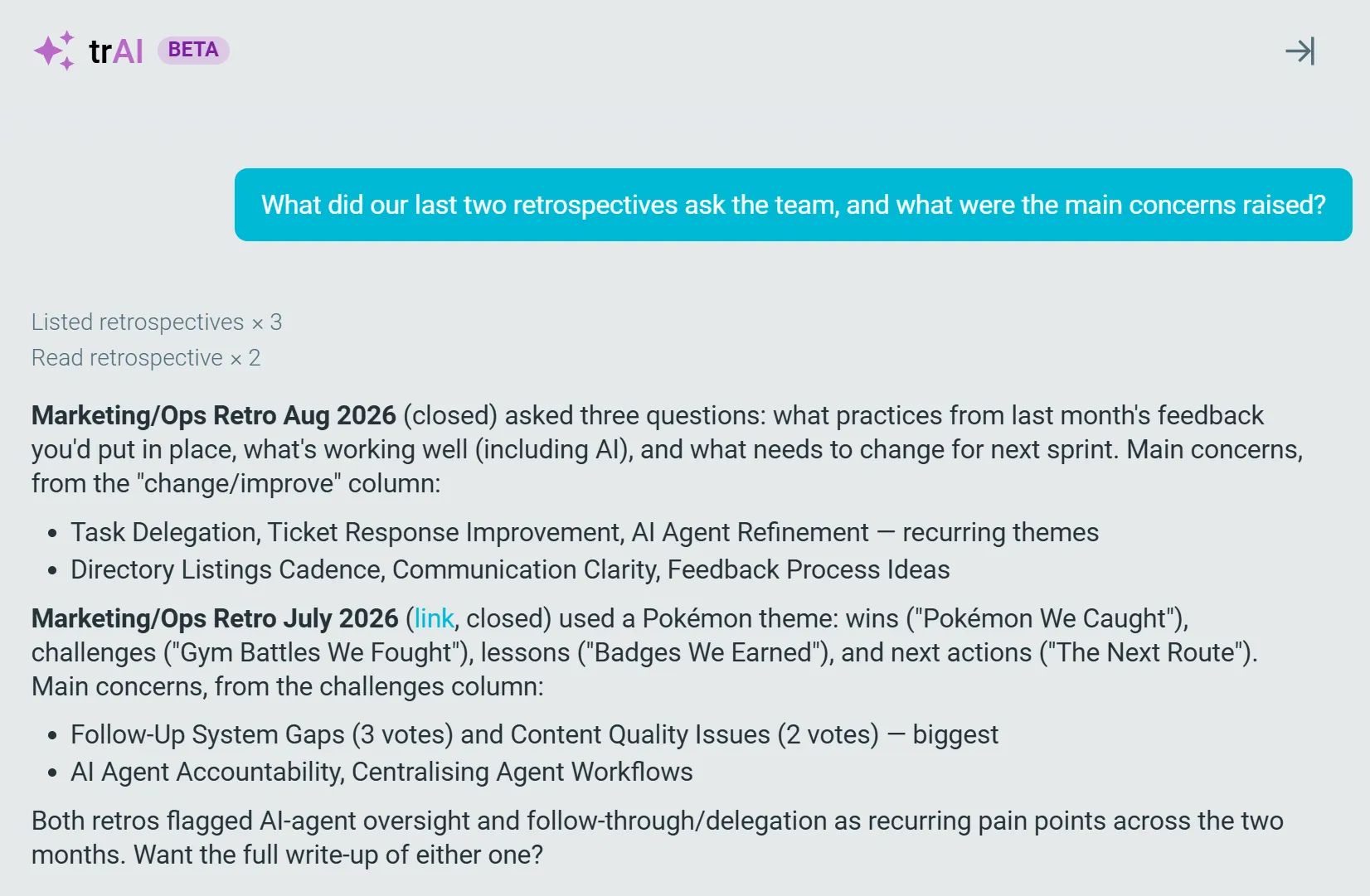
It read both, pulled out the main concerns from each, and ranked them by the team’s votes. Two had come up in both July and August: gaps in how we follow things up, and who looks after our AI agent workflows. Seeing them side by side, we put both straight onto that retro’s agenda.
Still, two retros don’t make a pattern. Was this a blip, or something bigger?
View 2: the word cloud in team Insights
So at the end of the meeting, we stepped back and opened the word cloud in team Insights for the last quarter.
Shown by theme, the word cloud sizes each term by how often it came up and colors it by sentiment. Our Ceremonies & Meetings cloud was mostly big and green, with Meeting Cadence, Marketing Meetings, Standups and Retrospectives all prominent, a sign the team values its rituals.
Two smaller terms were red, though: Meeting Scheduling and Communication Clarity.
Drilling into them turned up calendar conflicts, and some uncertainty about how to manage the team kanban board, from classifying cards to making sure they’re complete.
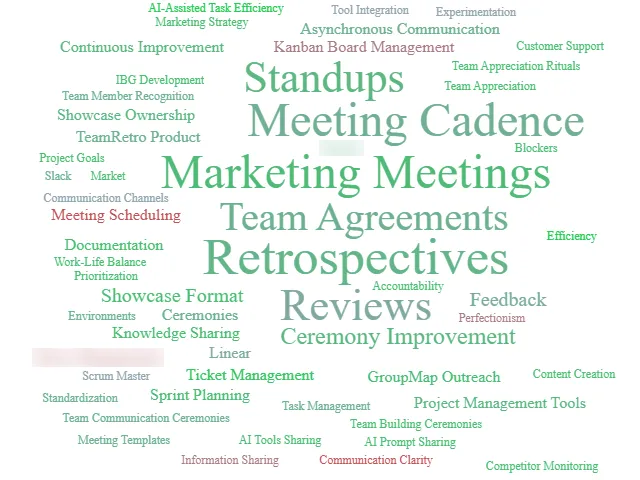
So the team’s rituals were sound, but the scheduling and communication around them needed work. To see whether that was part of a wider shift, we needed a longer view.
View 3: the team sentiment trends chart
That meant zooming out to the whole year. The trend chart in Insights tracks sentiment over time, alongside an AI-written summary of the major themes.
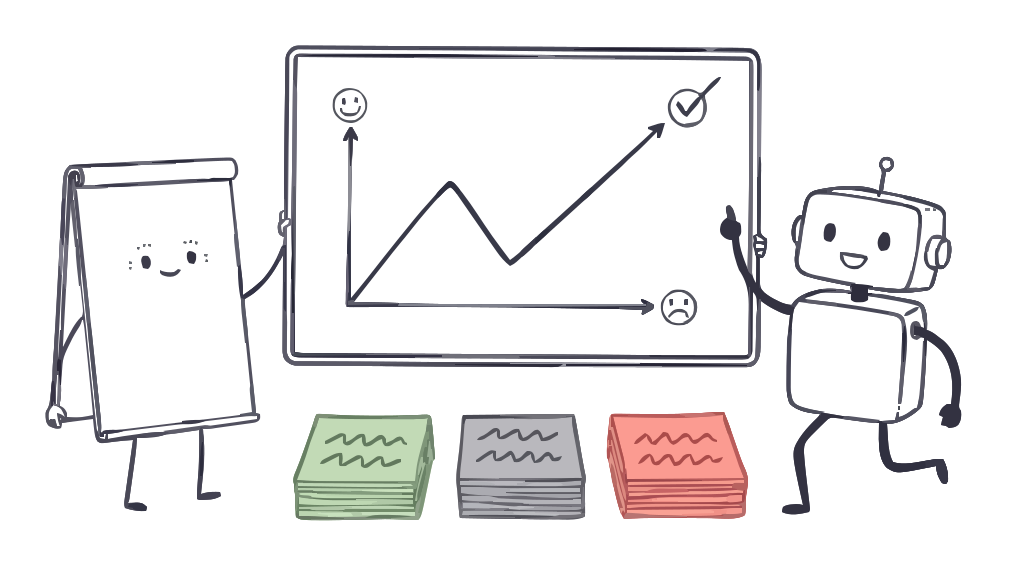
We used the breakdown view, which shows each sentiment as a share of all responses: green positive, gray neutral, red negative. Hovering over a point shows the split for the last known retrospective, and August caught our eye:
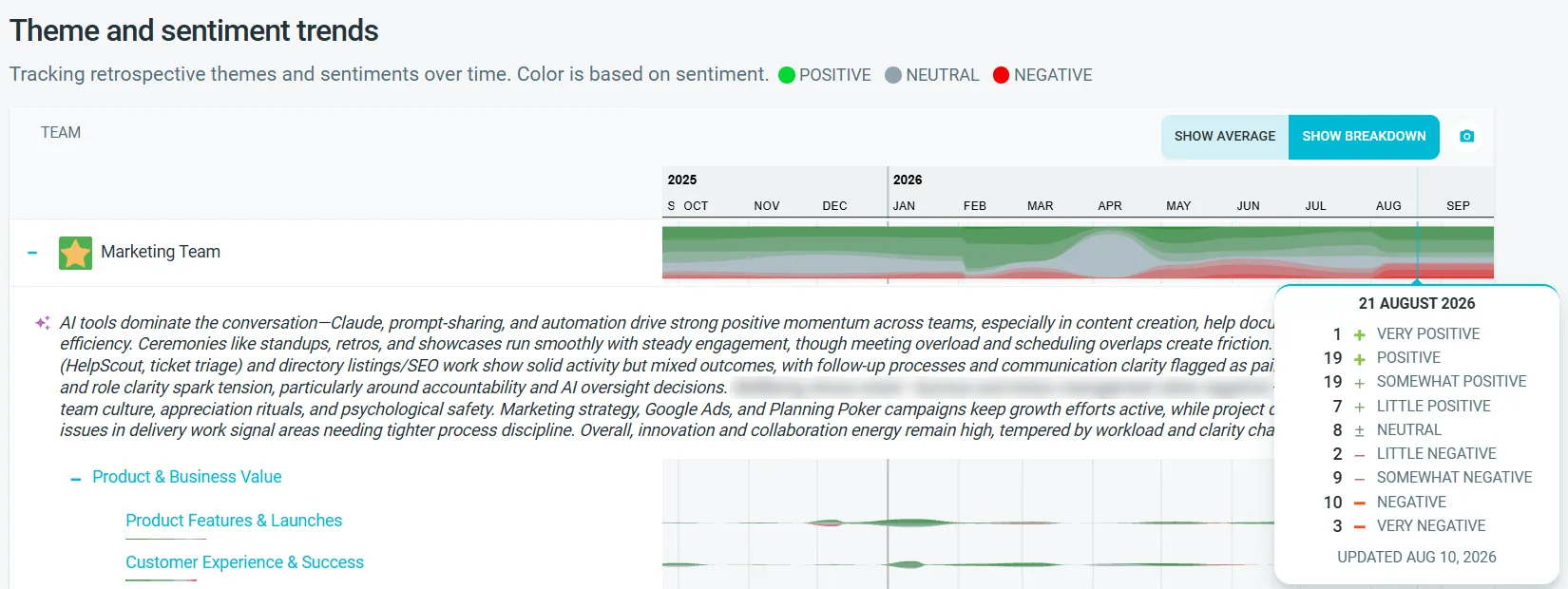
By August, our retros had turned noticeably redder. Negative responses had grown from under 7% at the start of the year to 31%.
That sounds alarming, but a redder chart isn’t automatically bad news; sometimes it means a team is finally saying what needs to change. What the chart couldn’t tell us was why.
The AI summary: where we looked first
Directly under the chart, an AI-written summary condenses everything the team wrote across the period into one paragraph. Ours was upbeat about the big picture, saying AI tools “drive strong positive momentum.” It also named three things the team kept raising:
- “meeting overload and scheduling overlaps create friction”
- “follow-up processes and communication clarity flagged as pain points”
- “ownership and role clarity spark tension, particularly around accountability and AI oversight decisions”
There they were again: the follow-up gaps and AI oversight trAI had flagged, plus the meeting friction from the word cloud. Nobody had to reread a year of sticky notes to find them. Use the summary to know where to look; use the themes to check it.
The theme breakdown: checking the summary
To check it, we looked at the rows below the summary. Each recurring theme is drawn as a band: the thicker the band, the more the team wrote about that theme, and its color shows sentiment. Read the thickness before the color. A thick red band is something the whole team is raising, often under a topic such as “What isn’t working?” or “What didn’t go well?”
Around August, three themes carried most of the red:
- Meeting Cadence & Optimization swelled over June and July, with red running through it.
- Communication Clarity & Channels carried red through the middle of the year.
- Dev & Automation Tools was thick, with red underneath, as the team worked out who looks after the automated workflows it had built.
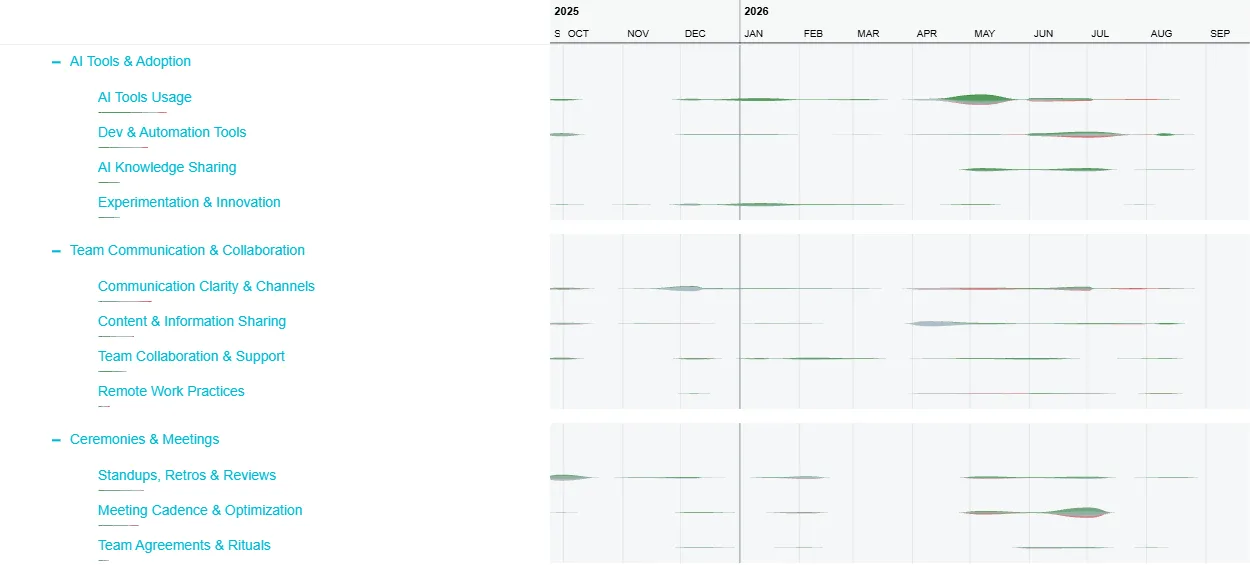
Underneath the Meeting Cadence swell is what the team actually wrote, like this from a single retro:
- “Having too many meetings in one day - need to consolidate”
- “Ops meetings are important for check-ins – but don’t have to be the full planned hour if not needed”
- “Can we put 5–10 min breaks between meetings?”
- “Individual kanban meetings – make it part of the weekly marketing meeting instead”
View 4: the rear-view mirror, with Claude over MCP
By now we knew what the team was raising, but not how long it had been building, so we went back to the team’s own history.
We connected Claude to TeamRetro over MCP, which lets it read the retrospectives themselves (the cards, votes and actions), and asked it to trace each concern back through the year.
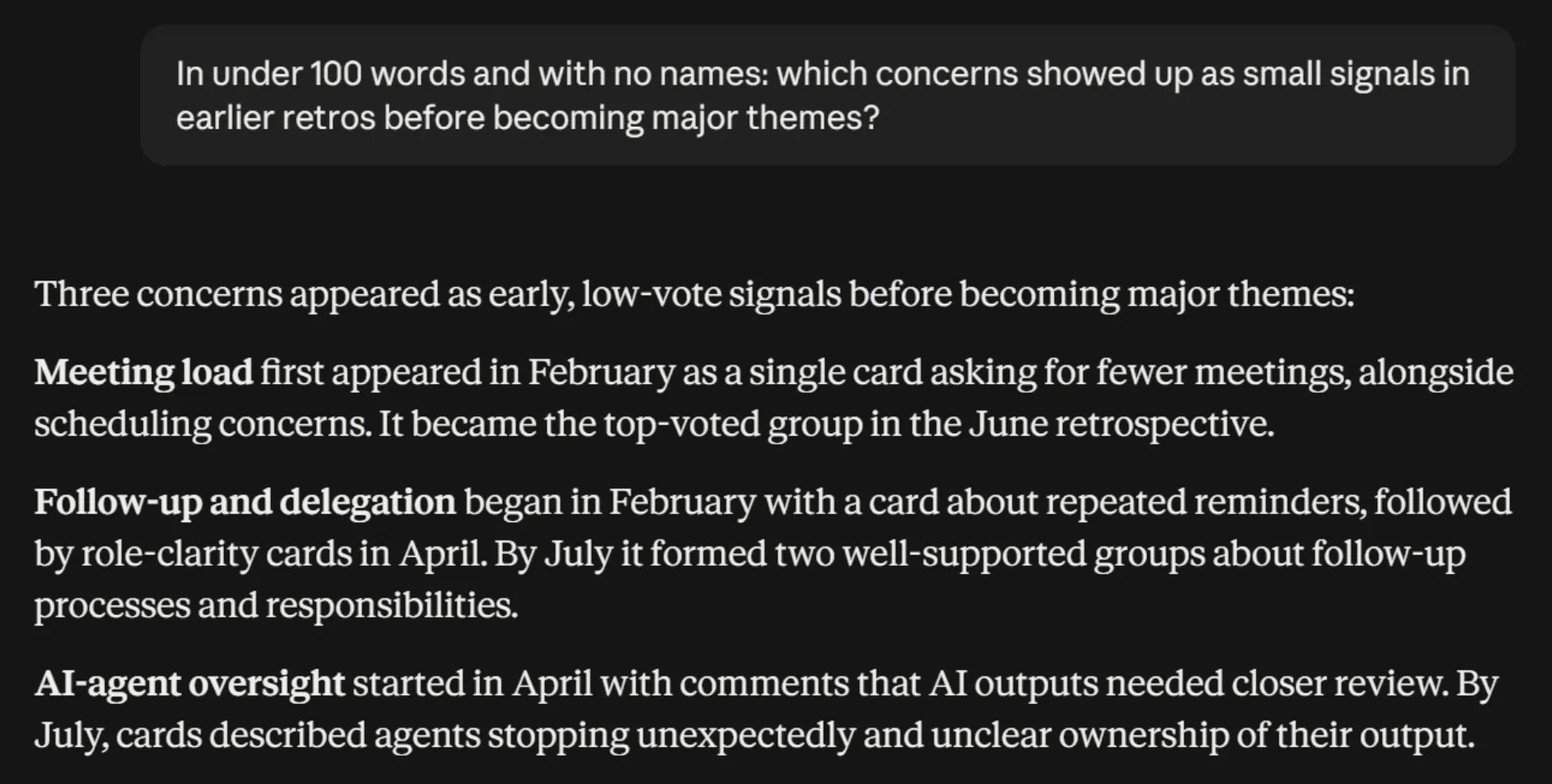
Every major theme had started small. Meeting load first appeared in February as a single card asking for fewer meetings, and by June it was the top-voted group. Follow-up and delegation began the same way, with one card about repeated reminders. Those first cards were thin lines in the themes view, easy to scroll past, and they only became clear priorities once the team started voting them up and flagging them as something to fix.
View 5: the team’s actions (arguably the most important view)
Spotting the pattern was only half the job. The other half was checking we’d done something about it. We asked Claude which actions came out of each theme and whether they’d been done. Most had:
- Meetings. The team dropped two recurring meetings, folding their items into the weekly marketing meeting, and moved its ticket review to the afternoon to keep mornings clear. A later retro noted: “Stand-ups have improved and the quick sharing of daily focus has helped with staying on time.” Protecting focus time is next, with a shared booking system for focus slots now an open action.
- Follow-up. The team changed the retro itself, adding an opening column that asks “What did you reflect, change and improve on from the last retrospective?”, so follow-through gets checked in the room.
- AI workflows. The team ran prompt-sharing sessions, brought more people onto the same AI tools, and set up a monthly session to share how everyone’s workflows run.
Some of these landed quickly; others are still in progress. That brought us back to where we started: the retro. The open items, like protecting focus time, carry into the next one, and the chart will show whether the red moves on to the next thing worth improving.
The lessons we learned along the way
A neutral chart can mislead
Around April, our chart went almost entirely gray, with 84% of responses neutral. It looked as if the team had gone flat.
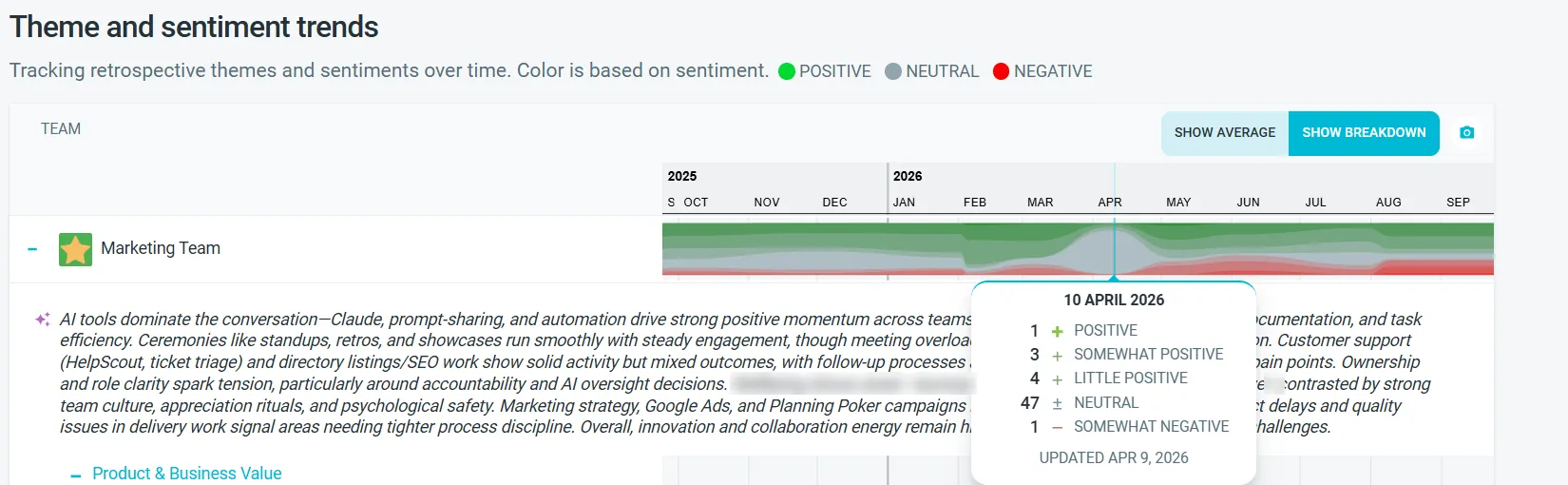
It hadn’t. That month’s retro was run as an agenda, with topics called To Discuss, In Progress and Discussed, and short items like “R&D Submission”. Status updates don’t say how anyone feels, so the chart had little to read.
Only positive sentiment could mean a winning or a dysfunctional team
If your team’s sentiment is only ever positive, it could mean people don’t feel safe saying what’s really on their minds. Or the team may be doing so well that it isn’t facing many challenges, and it’s time to review the meeting’s cadence or purpose, or try a different format. Either way, it’s up to the Scrum Master to decide what to do next.
Negative sentiment in a retrospective isn’t always a bad sign
A single retro’s sentiment is mostly noise. One hard sprint, one release, one departure will color an afternoon. The pattern is what matters, and ours showed a team that was asked what needed to change, answered specifically, and acted on it.
| Healthy red | Worth a closer look |
|---|---|
| You asked for it: the topic invites what needs to change | Red everywhere, with no clear theme behind it |
| It is specific: you can name the theme and the terms | The same red returning unchanged, retro after retro |
| It moves: once you act, the conversation shifts to the next issue | Silence: gray where you expected opinions |
None of the tools decided that for us. The team decided what it meant and what to do about it, in the room, with the people who wrote the words. What AI did was offer suggestions and prompts, and flag trends.
How to use AI sentiment analysis in your retrospectives
- Read it as a prompt, not a verdict. Open the next retro on the theme whose line moved: “Meetings have come up for three retros now. What would help?”
- Look at the moving lines first. A theme that is turning negative and being raised more often is the one that will fill the next retro whether you plan for it or not.
- Keep it at team level. Sentiment belongs to topics and themes. Don’t try to work backwards to who wrote what; the retrospective’s anonymity settings exist so people can be honest.
- Pair it with your health checks. A health check asks how the team feels, on a scale, about dimensions you chose in advance. Sentiment analysis reads what the team chose to raise. When the two agree, you have a pattern. When they disagree, you have found the conversation for your next retro.
- Don’t trade the retro for the chart. Cut the retros, or run them so nobody writes what they think, and the chart goes quiet at exactly the moment the team has the most to say.
Questions worth asking. These are the prompts we used, or ones the tools are built for:
- “What did our last two retrospectives ask, and what concerns came up?” (trAI)
- “Which concerns showed up as small signals before becoming major themes?” (Claude or another assistant over MCP)
- “What actions came out of our meeting-related feedback, and are they done?” (over MCP)
- “Summarize our last retrospective.” (trAI or over MCP)
Getting started with sentiment analysis in TeamRetro
Open Insights for any team that has run a few retrospectives in TeamRetro and look at the theme and sentiment trend chart first. The help center article on topic sentiment walks through the five options for a topic’s label and how the AI can analyze comments. If your team is not on TeamRetro yet, start a free trial, run three retrospectives, and see what the trend line says about the fourth.
Frequently asked questions
What does AI sentiment analysis in a retrospective actually analyze?
AI sentiment analysis in a retrospective reads what your team writes during the meeting. In TeamRetro Insights, the AI annotates the discussion with a theme, a sentiment and keywords, and the trend chart shows positive, neutral and negative sentiment for each recurring theme over time, with word clouds, real examples and an AI-written summary behind it.
Can it tell who wrote a negative comment?
Sentiment is assigned to topics and themes, not to people, so there is no per-person mood score. Whether comments include names depends on the anonymity setting you chose for the retrospective, which stays under your control.
Which TeamRetro plans include AI sentiment analysis?
Team-level sentiment and topic insights are included on every plan, from a single team up to a large organization. Cross-team Insights and Reports, which compare sentiment across many teams in one account, are part of the Enterprise plan.
Is our retrospective data used to train AI?
No. The analysis runs through AWS Bedrock, is on by default and can be turned off at any time. The data is processed briefly and is never stored or used to train the AI, and TeamRetro does not build or train models of its own.
Related posts
- October 7, 2026Daily standups in TeamRetro: post before you meet, and keep every blocker in sight
- June 25, 2026Online whiteboards for retrospectives: templates and techniques that work
- November 11, 2025What is planning poker? A beginners guide for agile estimation
- February 7, 2024Scrum paradigms: chickens vs pigs and the Observer Role in agile meetings

- July 29, 2020Feature spotlight: define your retrospective templates
- July 29, 2020TeamRetro templates now available in multiple languages!
- September 23, 2026CLAUDE.md for teams: how we turned five people's AI memories into shared rules
- August 20, 2026Meet trAI, your in-meeting AI assistant