IA na gestão ágil de projetos: o que as equipes precisam saber
Como será a IA na gestão ágil de projetos em 2026: os dados, as estruturas e como as equipes estão adaptando suas cerimônias.
Se você tem pesquisado “IA na gestão ágil de projetos” ultimamente, está em boa companhia. O Relatório de Profissionais da AI4Agile 2026 revelou que 83% dos profissionais ágeis já utilizam ferramentas de IA, mas 55% dedicam 10% ou menos de seu tempo de trabalho a elas, e apenas 15% receberam algum treinamento formal sobre o uso da IA em um contexto ágil. A adoção é quase universal. O aprofundamento, não.
É sobre essa lacuna que trata este guia. Não se trata de mais um artigo de opinião sobre se a IA substituirá os Scrum Masters (o setor já superou, em grande parte, essa questão), mas de uma compilação do que as pesquisas e atualizações de frameworks de 2026 realmente dizem: onde a IA se encaixa no ciclo de vida ágil, como a função do Scrum Master está sendo redefinida e o que as equipes estão fazendo em seus primeiros sprints de adoção. Quando nossa própria experiência na TeamRetro for relevante, vamos mencionar. Quando não for, indicaremos a fonte original.
O que a IA na gestão ágil de projetos realmente significa
Na entrega ágil, a IA significa utilizar o aprendizado de máquina e a automação para apoiar a forma como as equipes planejam, desenvolvem, refletem e melhoram continuamente, sem delegar as decisões que exigem o julgamento humano.
Uma maneira útil de pensar sobre isso vem da palestra Scrum Master 2.0: The AI Catalyst, ministrada por Dave West no Online Scrum Summit 2026, que descreve quatro modos de engajamento:
- Com IA: as ferramentas aumentam a produtividade individual. A maioria das equipes começa (e fica estagnada) nessa fase.
- Por meio da IA: software criado a partir da descrição da intenção; a qualidade e a validação das especificações passam a ser o gargalo, e não o desenvolvimento.
- Sobre a IA: A IA age com autonomia significativa, e o Scrum evolui em direção a uma estrutura de governança e supervisão.
- Sobre IA: o próprio produto é IA, o que torna a avaliação de modelos e os fluxos de dados questões de engenharia de primeira ordem.
É importante saber em que modo sua equipe está, pois, como observa West, a maioria das equipes acredita que está trabalhando “com a IA”, enquanto, na verdade, está silenciosamente se deixando levar “pela IA”, sem reformular nada em relação à forma como trabalham em conjunto.
O que os dados de 2026 revelam sobre a IA em equipes ágeis
A constatação mais consistente em todas as pesquisas atuais é um paradoxo da velocidade: os ganhos individuais não se transformam automaticamente em ganhos da equipe.
A palestra principal do OSM 2026 reúne as evidências. Estudos controlados mostram que a IA conclui certas tarefas de desenvolvimento 55% mais rápido (GitHub/Microsoft, 2025). Mas uma pesquisa longitudinal em 211 milhões de linhas de código constatou que a duplicação de código quadruplicou à medida que a adoção da IA aumentou (GitClear, 2024), e um estudo piloto do METR de 2025 não encontrou ganho de produtividade estatisticamente significativo, embora os participantes acreditassem estar 20% mais rápidos. Como diz West: “A fluência individual não é sinônimo de capacidade da equipe — e ninguém é responsável por preencher essa lacuna.”
O relatório da AI4Agile aponta para a mesma conclusão do ponto de vista dos profissionais. O maior obstáculo à adoção não é o ceticismo nem as ferramentas. É a incerteza quanto à integração (54%): as equipes não sabem onde a IA se encaixa em seus fluxos de trabalho. E a área em que os profissionais relatam o valor mais evidente é justamente a menos glamorosa: redigir, resumir, preparar e documentar. A IA justifica sua existência ao criar espaço para a facilitação, o diálogo e a tomada de decisões, e não ao substituí-los.
O papel da IA no ciclo de vida de entrega ágil
Planejamento do sprint e refinamento do backlog
O AI-Native SAFe, lançado pela Scaled Agile em junho de 2026, recomenda começar com previsões, descoberta de conhecimento e refinamento do backlog, reforçando as “apostas informadas” que sempre foram a essência do planejamento ágil. Na prática, isso significa que dados históricos de velocidade sinalizam um sprint sobrecarregado antes mesmo de ele começar e revelam itens do backlog que não estão suficientemente definidos para serem selecionados com segurança. Para equipes distribuídas que planejam de forma assíncrona, esse sinal substitui a avaliação intuitiva em tempo real que uma equipe co-localizada obtém naturalmente.
Uma observação importante da palestra principal do OSM: cinco desenvolvedores que utilizam IA, mas que não compartilham uma meta de sprint, criam cinco soluções divergentes, mais rapidamente do que nunca. A IA aumenta a importância do alinhamento; ela não a diminui.
Qualidade da entrega e a definição de “concluído”
É nesse ponto que a orientação para 2026 é mais incisiva. A IA gera resultados rapidamente; a Definição de Concluído (DoD) é o que garante que o trabalho esteja realmente concluído, e não apenas “mais ou menos” concluído. A recomendação de West é adicionar critérios explícitos de qualidade da IA à DoD: pontos de verificação em transferências de responsabilidade importantes, nos quais o julgamento humano seja deliberadamente preservado. Os dados de duplicação do GitClear são o argumento que explica o motivo: resultados de IA não revisados prejudicam a qualidade de forma imperceptível, em pontos que ninguém está observando.
Retrospectivas sem a carga administrativa
Essa é a parte do ciclo de vida que conhecemos melhor na TeamRetro; portanto, considere esta seção como uma experiência prática, e não como um relato imparcial.
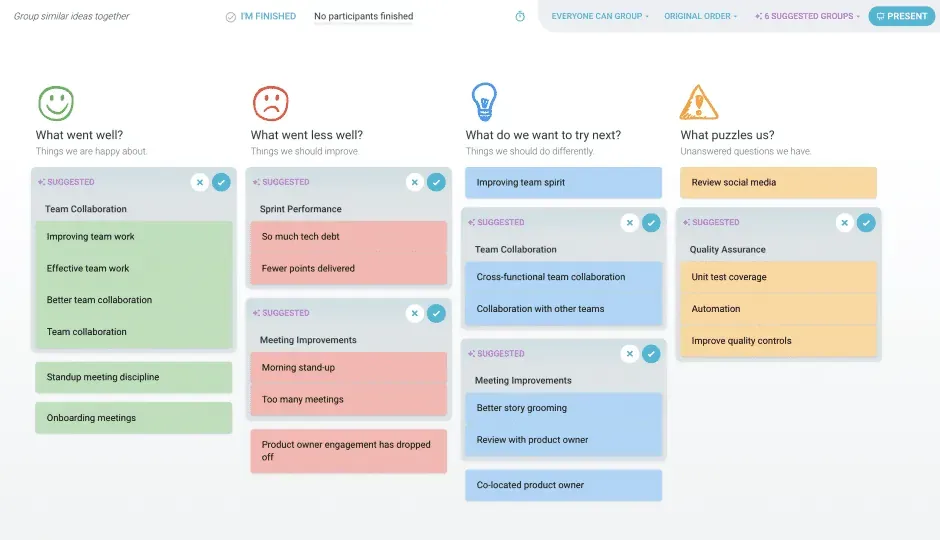
A retrospectiva é onde o diálogo do setor e as ferramentas se encontram. A constatação do AI4Agile (a IA é mais valorizada por resumir e documentar) descreve exatamente a carga administrativa que prejudica as retrospectivas: classificar feedbacks, redigir notas, acompanhar itens de ação entre sprints. No TeamRetro, a função “Grupos de Sugestão Automática” agrupa feedbacks semelhantes durante a etapa de agrupamento, para que as equipes passem diretamente à discussão, e a função “Ações Sugeridas pela IA” gera os próximos passos vinculados às ideias específicas que os moldaram: o raciocínio é mostrado, há votação da equipe e não há resultados de “caixa preta” que o facilitador precise defender. Para ver passo a passo como cada um desses recursos funciona, consulte nosso guia sobre recursos de retrospectiva impulsionados por IA.
A palestra principal do OSM destaca uma prática que gostaríamos de ressaltar: analise sua retrospectiva sob a ótica da IA. O que delegamos neste sprint? O que revisamos? Em que confiamos demais? Equipes que nunca fizeram uma retrospectiva sobre seu próprio uso da IA são, nas palavras de West, as mais perigosas: elas acham que a IA está indo bem porque os indivíduos são produtivos, mas nunca analisaram a questão coletivamente.
Quer experimentar um retro assistido por IA com uma lente de IA integrada? Experimente um gratuitamente no TeamRetro. Não é necessário fazer nenhuma configuração.
Saúde e ânimo da equipe ao longo do tempo
Pesquisas sobre retrospectivas remotas revelaram que o anonimato cria um ambiente mais seguro para um feedback sincero: a segurança psicológica é simplesmente mais difícil de estabelecer por meio de uma tela. A palestra principal do OSM aborda o mesmo ponto sob outra perspectiva: os seres humanos que trabalham ao lado da IA precisam de mais confiança para se manifestarem quando algo parece errado, e não de menos.
 de desempenho
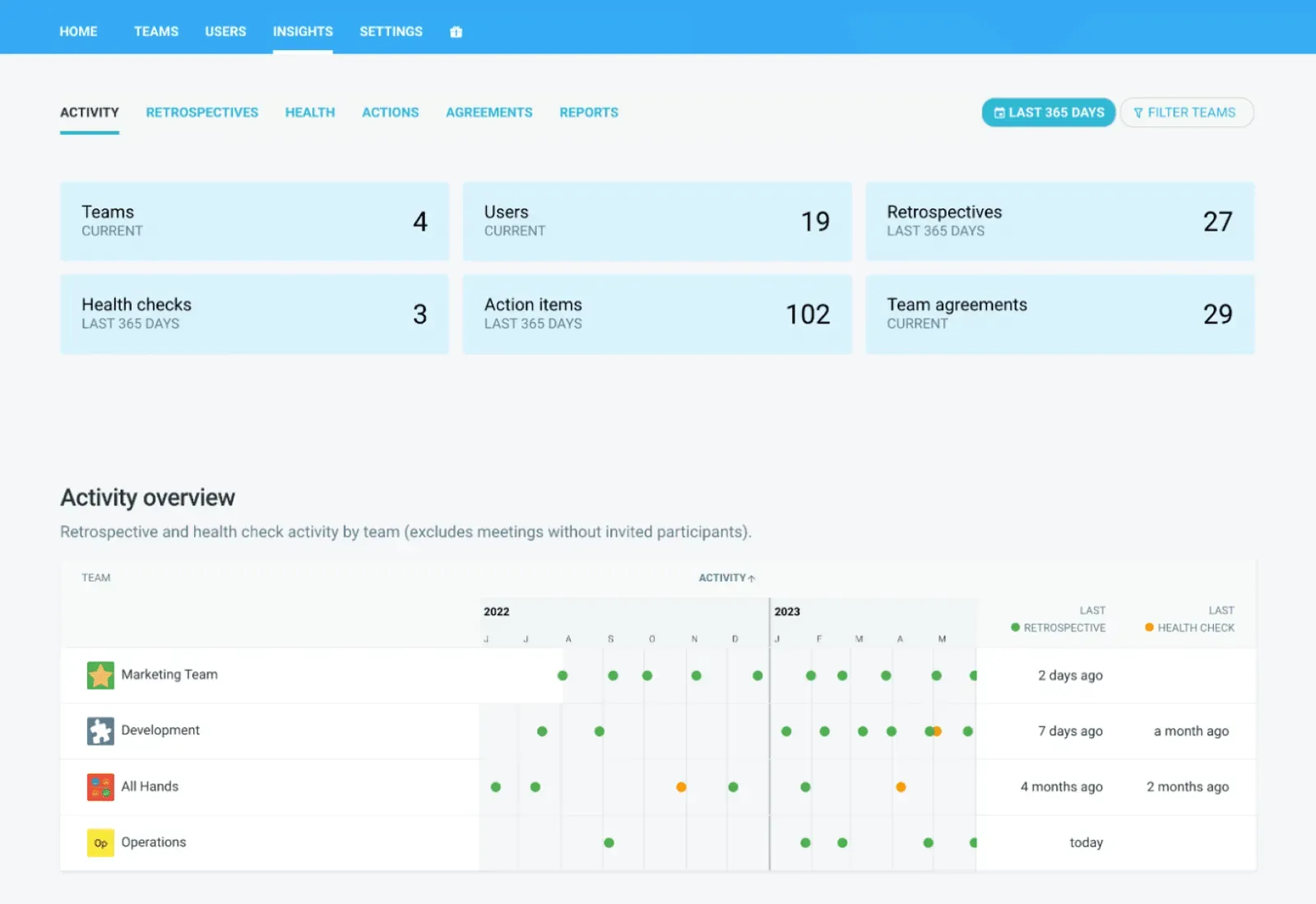
A IA ajuda nesse sentido, no nível dos padrões. No TeamRetro, o painel Insights acompanha os temas de sentimento nas retrospectivas e nas avaliações de saúde ao longo do tempo; assim, se o “processo de implantação” continuar surgindo em três retrospectivas consecutivas, ou se os índices de segurança psicológica estiverem diminuindo discretamente, isso aparecerá nos dados de tendências, em vez de ficar em uma planilha que ninguém abre.
O novo papel do Scrum Master: o catalisador da IA
A reformulação mais marcante de 2026 é de autoria da Scrum.org. A responsabilidade do Scrum Master não mudou (o Guia do Scrum de 2020 ainda menciona “a eficácia da Equipe Scrum”), mas o significado de eficácia sim. Em 2026, isso significa garantir que a IA acelere o trabalho da equipe, e não apenas o dos indivíduos que a compõem.
West chama isso de Catalisador de IA: não o especialista em IA da equipe, mas seu líder de eficácia em IA, que atua em três frentes: diagnosticar (em que nível da escala de fluência a equipe se encontra e em qual modo de engajamento ela realmente está?), projetar (recalibrar os eventos Scrum existentes para o trabalho assistido por IA, em vez de simplesmente acrescentar novas cerimônias) e desenvolver (criar hábitos na equipe, como modelos de prompts, padrões compartilhados e pontos de verificação, em vez de soluções individuais improvisadas).
Um risco mencionado na palestra que merece maior atenção: dívida de capacidade. Quando a IA assume o trabalho de execução que antes servia para desenvolver o discernimento dos profissionais em início de carreira, é preciso que alguém elabore percursos de aprendizagem deliberados em paralelo ao uso da IA. Esse é um problema de orientação, não de ferramentas, e recai diretamente sobre o Scrum Master.
Gestão da IA em grande escala: lições do SAFe nativo para IA
Para equipes em ambientes escalonados, o AI-Native SAFe (junho de 2026) indica para onde as expectativas corporativas estão se dirigindo: equipes menores, potenciadas pela IA; ciclos de trabalho mais curtos e iterativos; e, notavelmente, transferências de tarefas entre humanos e IA explicitamente incorporadas ao modelo operacional, em vez de serem deixadas à interpretação individual. Ele também introduz a função de “arquiteto de valor de IA”, que abrange aspectos de custo, ética, questões jurídicas e risco, e eleva a governança, as especificações e a intenção, bem como o gerenciamento de dados selecionados, a elementos de primeira linha da estrutura.
Não é preciso implementar o SAFe para que essa lição se aplique: em qualquer escala, o padrão é o mesmo. Combine pilotos de IA com governança e KPIs focados em resultados, e planeje deliberadamente as transições entre humanos e IA.
Como incorporar a IA ao seu fluxo de trabalho ágil
A palestra principal do OSM encerra-se com um plano de três sprints que reflete o que vimos funcionar: começar aos poucos, manter uma abordagem empírica e tratar a própria adoção como algo a ser analisado e adaptado.
- Neste sprint: diagnosticar. Realize uma avaliação do nível de familiaridade com a IA em equipe, e não uma auditoria de ferramentas. Em qual modo de engajamento você realmente se encontra? Onde a IA está sendo usada de forma individual e invisível, em comparação com o uso coletivo e transparente? Seja honesto.
- Próximo sprint: design. Atualize sua Definição de Concluído para resultados gerados por IA. Realize uma retrospectiva com um enfoque explícito na IA: em que pontos confiamos demais?
- O sprint seguinte: desenvolvimento. Crie um fluxo de trabalho compartilhado com modelos de instruções e pontos de verificação, levando a fluência do nível individual para o nível da equipe.
- Em andamento: mantenha o processo em movimento. Faça uma retrospectiva sobre IA a cada sprint. Trate a dívida de capacidade como um item do backlog. Acompanhe se os bloqueadores recorrentes estão realmente diminuindo. O painel Insights do TeamRetro torna essa tendência visível em todas as equipes que você coordena.
Dois princípios são fundamentais em todo o processo. Seja transparente sobre o que a IA está fazendo: a segurança psicológica nas retrospectivas desmorona se as pessoas não souberem se o feedback é anônimo ou como a IA o está utilizando. E mantenha o facilitador presente na sala: a IA lida com o agrupamento, a síntese e as sugestões, mas não consegue perceber o clima da sala. Como diz West: “Você não precisa de um programa de transformação. Você precisa de empirismo aplicado à adoção da IA — um sprint de cada vez.”
Os riscos da IA no ágil e como gerenciá-los
Dependência excessiva do resultado. A pior forma de trabalho em equipe assistido por IA é quando a equipe fica esperando que a IA diga o que ela pensa. A discordância sincera (aquele momento em que alguém finalmente diz o que ninguém vinha dizendo) não pode ser automatizada.
Dados superficiais geram insights superficiais. A detecção de padrões depende da qualidade de seus dados de entrada. Equipes novas, equipes com baixa participação e retrospetivas meramente formais produzirão resultados que não refletem a realidade. Trate os insights como um ponto de partida para a discussão, não como a verdade absoluta.
Dívida de capacidade. Já abordado acima, mas vale a pena repetir como um risco: se os juniores deixarem de realizar o trabalho que desenvolve o discernimento, a capacidade futura da sua equipe estará se deteriorando silenciosamente, mesmo que seu ritmo atual pareça excelente.
Privacidade e segurança de dados. O feedback retrospectivo é um assunto delicado. Pesquisas sobre a adoção de ferramentas ágeis apontam consistentemente a privacidade e a confiança como os principais obstáculos à adoção. Verifique onde seus dados estão armazenados e quem tem acesso a eles. A TeamRetro possui um relatório SOC 2 Tipo 2 e está em conformidade com o LGPD, e os dados dos clientes nunca são utilizados para treinar modelos de IA.
O que a IA muda no ágil e o que ela não muda
Os dados de 2026 apontam para uma direção: a IA na gestão ágil de projetos não altera o propósito das cerimônias. Ela altera o nível de atrito que elas geram e eleva o padrão do trabalho humano de alinhamento, julgamento e diálogo sincero.
As estruturas têm mais pontos em comum do que diferenças. O Scrum.org recomenda aprimorar os eventos já existentes, em vez de simplesmente acrescentar cerimônias de IA. O SAFe sugere que as transferências entre humanos e IA sejam planejadas de forma deliberada e reguladas. Os dados dos profissionais indicam que o verdadeiro valor da IA está em eliminar as tarefas administrativas para que a conversa possa acontecer. O que resta, uma vez que o agrupamento é automático e o resumo se escreve sozinho, é a conversa. E a conversa sempre foi o objetivo.
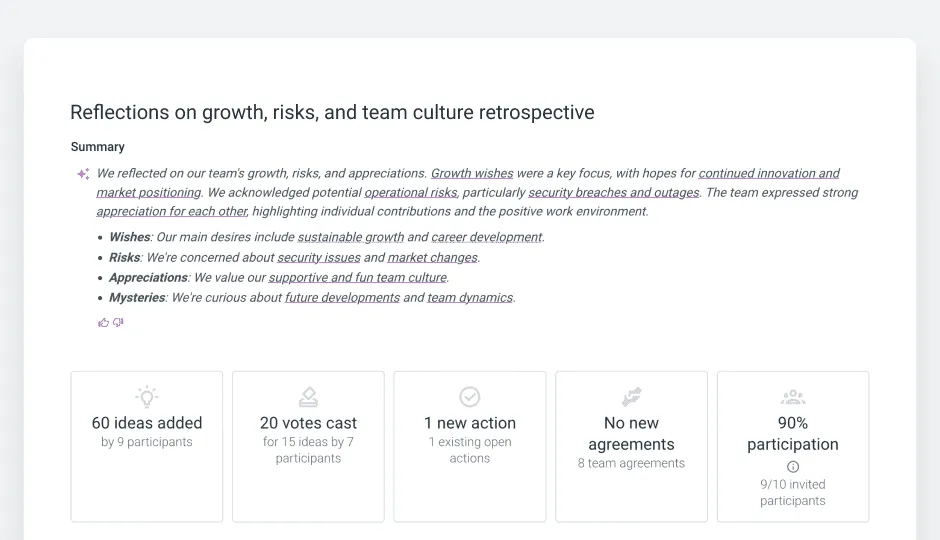
Esse é o princípio no qual se baseiam os recursos de IA do TeamRetro: a IA mostra como chega a essa conclusão, e a equipe mantém o controle. Se você quiser ver como isso funciona na sua próxima retrospetiva, experimente o TeamRetro gratuitamente com sua equipe.
Fontes citadas: Relatório dos Profissionais do AI4Agile 2026 (Scrum.org) · Dave West, Scrum Master 2.0: The AI Catalyst, Online Scrum Summit 2026 · Orientações do SAFe / Scaled Agile AI nativas de IA · Pesquisa sobre qualidade de código da GitClear · Pesquisa sobre retrospectivas remotas e anonimato
Artigos relacionados
- 23 de setembro de 2026CLAUDE.md para equipes: como transformamos as memórias de IA de cinco pessoas em regras compartilhadas
- 18 de julho de 2026As melhores ferramentas de avaliação do bem-estar da equipe em 2026
- 18 de julho de 2026Nossos colegas de equipe de IA se juntaram ao nosso evento retrô
- 13 de julho de 2026A engenharia de contexto precisa de um ciclo de feedback
- 13 de julho de 2026Como coletar feedback de seus agentes de IA
- 19 de junho de 2026As melhores ferramentas de colaboração para equipes remotas em 2026 (e o elemento que falta na maioria das pilhas de ferramentas)
- 16 de junho de 2026Mais de 60 perguntas para o quebra-gelo em equipes ágeis e Scrum
- 8 de junho de 202673 citações sobre trabalho em equipe para motivar e inspirar sua equipe